Broadcast One Prompt to Every Agent: How Parallel AI Coding Actually Works
Broadcast one prompt across PTY-backed agent sessions in CodeGrid. Cut retyping, keep status visible, and manage parallel work on one canvas.
What is broadcasting one prompt to every agent?
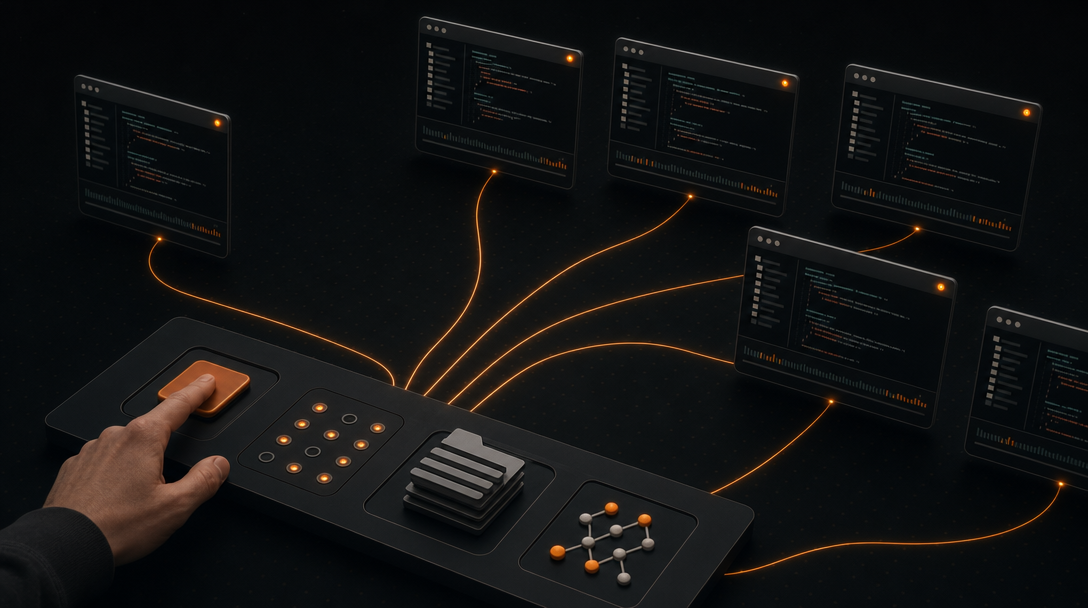
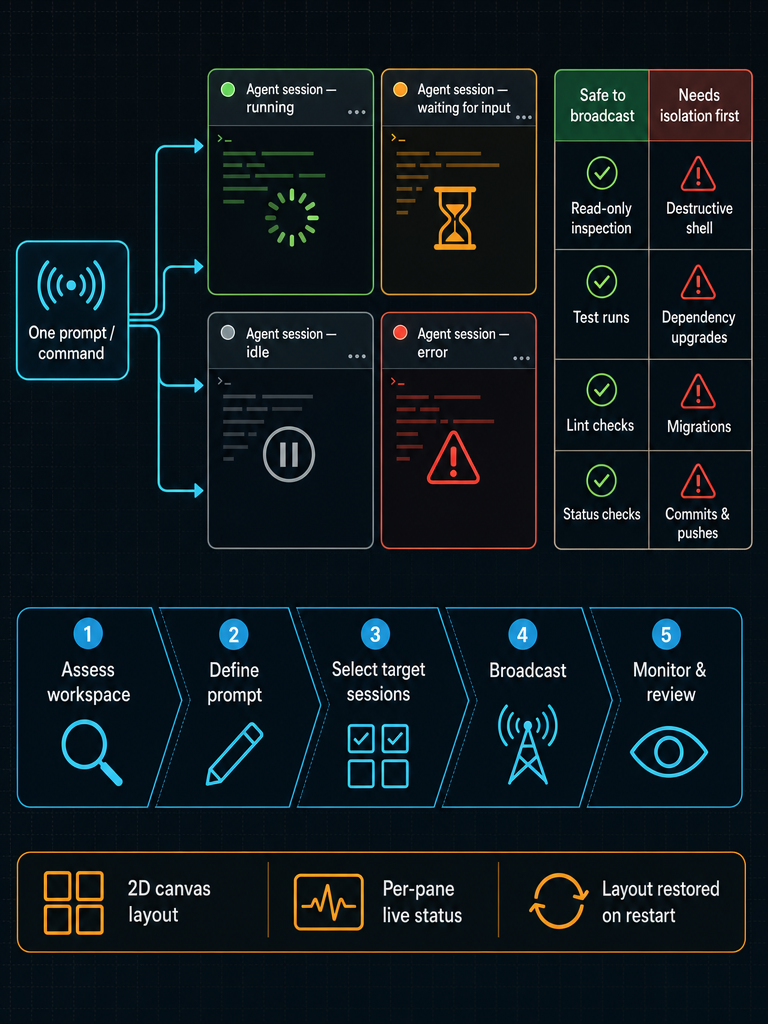
Broadcasting one prompt to every agent means sending a single command or instruction into multiple terminal-backed agent sessions at once, instead of typing it into each pane individually. It's a controlled multi-PTY orchestration pattern: you pick the target sessions, send keystrokes to all of them simultaneously, and each agent runs the command in its own working directory against its own repo state.
This is different from generic "automation" or scripted CI runs. The agents stay interactive — they still prompt for input, still show their own output, still maintain conversation context with whichever coding assistant you've launched in that pane. You're just skipping the part where you tab through twelve panes retyping npm test or please run the linter and fix obvious issues.
In CodeGrid, every session — whether it's a terminal-based coding agent or a plain zsh — lives in its own pane on a free-form 2D canvas. Panes can be dragged, resized, zoomed, and panned. Broadcast input is bound to Cmd+B: anything you type while broadcast mode is active goes to every selected pane's PTY at once.
Broadcast prompting is most useful when you're orchestrating five to twenty agent sessions across several repos and the marginal cost of retyping the same command becomes the actual bottleneck in your day. That's the shape of the workflow this article covers — not single-agent productivity, but the moment your terminal layout stops scaling.
When should you broadcast one prompt instead of prompting agents one by one?
Broadcast when the instruction is identical across sessions and the desired outcome is comparable across each. The clearest wins:
- Setup and environment commands:
nvm use,source .env,pnpm install,docker compose up -d. - Read-only inspection:
git status,git log --oneline -10,ls,pwd,which node. - Test and lint passes:
pnpm test,cargo check,ruff check .,tsc --noEmit. - Repo-wide audits via agents: "list any TODO comments added in the last week", "summarize the changes on this branch vs main", "report which dependencies are out of date".
- Parallel investigations: asking five agents the same architectural question across five client codebases and comparing the answers side by side.
Prompt one by one when the instruction depends on per-repo nuance — a refactor that touches a specific module, a migration that only one project needs, a fix tied to a particular failing test. Broadcasting "rename the User model to Account" across unrelated repos is how you generate twelve bad PRs in parallel.
The time-to-value is highest on the boring, repetitive end of the spectrum. That's also where developers lose the most minutes per day, so the compounding effect is real even when each individual command only saves fifteen seconds.
How to broadcast one prompt to multiple agents step by step
A reliable broadcast workflow has five steps. Skipping any of them is how you end up running rm -rf node_modules in a repo you didn't mean to touch.
- Assess the current workspace state. Zoom out on the canvas and confirm every pane you're about to target is idle and on the branch you expect. Check the status indicators (running / waiting / idle / error) before doing anything else. If a pane is mid-task, broadcasting will queue input into a running agent and produce unpredictable behavior.
- Define the prompt or command clearly. Write it out once, in full, with no ambiguous references like "this file" or "the previous branch". Broadcast prompts should be self-contained — each agent reads it without your earlier context. For agent prompts specifically, include the success criteria: "run the test suite and report only the failing test names" is broadcastable; "fix the tests" is not.
- Select the target sessions. Click to multi-select panes on the canvas, or group them by workspace. Exclude any pane belonging to a different client, a different branch, or a long-running task. Visible selection on the canvas is the safety control — you can literally see which panes will receive the keystrokes.
- Send the broadcast. Activate broadcast mode with
Cmd+B, type the command or prompt, and press return. Each PTY receives the input independently. You can also drive this from theCmd+Kcommand palette if you've saved the command as a snippet. - Monitor outcomes iteratively. Don't walk away. Watch the pane status indicators change from running to waiting or error, and address the failures first. Iterate: a broadcast prompt that produced three failures and two successes is information — refine the prompt, re-target the failed panes, and re-broadcast.
Run many agent sessions in parallel on a single canvas with
Cmd+Bbroadcast and live status — Download CodeGrid for macOS.
The pattern matches the generic implementation model — assess, define, execute iteratively — but the iteration loop is where multi-agent work actually lives. Plan to broadcast three or four times for any non-trivial task.
How do you choose which agents or terminal sessions receive the broadcast?
Target selection is the main safety control in a broadcast workflow. Get it wrong and you've just run a destructive command across repos that had nothing to do with each other.
Group sessions deliberately. Useful grouping axes:
- By repo: all panes pointing at
client-a/apivsclient-a/webvsclient-b/*. - By branch or worktree: only panes on
feature/auth-refactorreceive the broadcast; panes onmaindo not. - By directory depth: monorepo sub-packages where the command only makes sense in
packages/ui. - By task type: "the four agents currently doing test-fixing" vs "the two agents doing documentation".
The canvas helps here because grouping is spatial. You can park all client-A panes in one zone, all client-B panes in another, and visually confirm the selection before broadcasting. Compare that to tmux or stacked terminal tabs, where the third pane in the second window could belong to anything — and where accidental input is one keystroke away.
| Layout | Visual grouping | Risk of cross-project mis-target |
|---|---|---|
| Terminal tabs | Title only | High — labels collapse, easy to typo into wrong tab |
| tmux panes | Position-based | Medium — depends on discipline |
| 2D canvas with zones | Spatial regions | Low — selection is visible before send |
The terminal sprawl pain point is real: once you cross roughly a dozen sessions across three or more repos, mental tracking fails. Spatial layout converts "which tab was that?" into "which corner of the canvas?" — a recall problem becomes a recognition problem.
Keep unrelated client work physically far from your broadcast target zone. The extra visual distance is cheap insurance.
What commands are safe to broadcast, and which ones need isolation first?
Treat broadcast targets the same way you'd treat a sudo command on a production host: assume it will run, assume you can't take it back, and only proceed if both are acceptable.
Generally safe to broadcast:
- Read-only inspection:
git status,git diff --stat,ls,cat,grep,rg. - Test runs:
pnpm test,cargo test,pytest -x. - Lint and type checks:
eslint .,ruff check,tsc --noEmit,cargo check. - Non-destructive agent prompts: "summarize", "list", "report", "describe", "compare".
- Status queries to running services:
curl localhost:3000/health,docker ps.
Requires isolation or per-pane confirmation:
- Destructive shell commands:
rm -rf,git reset --hard,git clean -fdx,DROP TABLE. - Dependency upgrades:
pnpm up --latest,cargo update,bundle update— version drift across repos compounds quickly. - Database migrations: schema changes need per-repo review.
- Mass refactor prompts: "rename X to Y everywhere", "convert all callbacks to async/await".
- Git write operations:
git commit -am,git push --force,git rebase. - Anything that modifies files without a clean worktree or branch isolation.
The isolation strategy is to broadcast only when every target pane is in a known-clean state — typically a dedicated worktree or feature branch — and to keep destructive operations as single-pane actions. For refactors, broadcast the investigation prompt ("which files reference the User model?") but execute the change one repo at a time, reviewing each diff.
Rollback paths matter too. Before broadcasting anything that writes, confirm every pane has either a clean commit to revert to or a worktree that can be discarded. "I'll just git reset if it goes wrong" only works when you know what state you started from in each pane.
How do you monitor multiple agents after broadcasting a command?
After the broadcast, the question is no longer "did I send the command?" but "which agents need me?" Live session awareness answers that.
CodeGrid renders four states on each pane: running, waiting, idle, and error. The indicators remain visible when the canvas is zoomed out, so a twenty-pane workspace still tells you at a glance which two are blocking on input and which one errored out. You don't have to tab through to check.
This solves the missed-prompts problem directly. A terminal-based agent that pauses to ask "do you want me to apply this change?" is invisible if it's in a background tab — work stalls and you don't notice for ten minutes. Spatial status indicators make stalls obvious within seconds.
A useful monitoring pattern after any broadcast:
- Scan for errors first. Red states are the highest-priority signal — usually a missing dependency, a wrong working directory, or a command the agent rejected.
- Address waiting states next. These are agents asking for input. Click into each, answer, and move on.
- Let running states run. Don't interrupt mid-task unless the timeout exceeds your patience.
- Verify idle states. Idle means the command finished. Zoom into a sample of these to confirm the actual output matches what you expected — a successful exit code doesn't always mean the agent did the right thing.
The 2D canvas is useful here precisely because status is spatial. You're not reading a list; you're seeing a map.
Broadcasting vs. alternatives: which is right for you?
Broadcasting is one approach to multi-session coordination, not the only one. The right choice depends on how many sessions you run and how much state you need to keep visible.
| Approach | Sessions it handles well | Setup complexity | Visibility of state | Time-to-value for broadcast |
|---|---|---|---|---|
| Manual retyping per pane | 1–3 | None | Per-pane focus | Low — retyping is the bottleneck |
| Terminal tabs | 3–8 | None | Title bar only | Low — tabs hide status |
| Split panes | 2–6 | Minimal | All visible, fixed grid | Medium — no broadcast input |
tmux with synchronize-panes | 4–15 | Moderate | Grid, text-only | High — but config-heavy |
| Canvas-first workspace (CodeGrid) | 10+ across multiple repos | Low | Spatial, with live status | High — Cmd+B is built in |
If you run two or three agents and they all fit on one screen, manual retyping or splits are fine. The overhead of any tool isn't worth it.
If you run a dozen agents across four repos and you've started missing prompts or losing track of which one is on which branch, the bottleneck has shifted from typing to attention. A canvas-first, session-aware workspace pays off because it gives you spatial recall and live status, not because broadcasting is magic.
tmux deserves a specific note: setw synchronize-panes on does broadcast input. It's a legitimate option for keyboard-first users who live in tmux. The trade-off is visual — tmux gives you a text grid with no per-pane status indicators and no easy way to group panes by repo without a custom config. It's a powerful tool that asks you to maintain it.
Pick the tool that matches the scale of your sprawl, not the tool with the most features. Three panes don't need a canvas. Twenty do.
How should Git review fit into a broadcast-driven workflow?
Broadcasting accelerates the doing. It doesn't remove the need to review. If anything, parallel agents make Git discipline more important — you now have five diffs to inspect instead of one, and they were generated faster than you can read them.
The non-negotiables:
- Review every diff before merging. Per repo, per branch. Don't accept agent output on faith just because the command exited cleanly.
- Confirm branch and worktree boundaries. An agent that wandered out of its assigned branch is a contamination risk.
git statusandgit logper pane before merge. - Compare changes across repos when the prompt was the same. If you broadcast "add a CHANGELOG entry for the auth fix" to five repos, the five diffs should look structurally similar. Outliers usually mean the agent misunderstood.
A built-in Git UI helps here because you can move from pane to diff without leaving the workspace. The same is true of a GitHub repo browser for inspecting how the change lands against the remote. The goal is to keep the review loop tight enough that you actually do it — a Git workflow that requires opening three other apps is a Git workflow you'll skip when you're tired.
Squash, review, and merge per repo. Never broadcast git push.
How do you restore and automate a multi-agent workspace after interruption?
A multi-agent workspace is fragile if you have to rebuild it every morning. Twenty panes, twenty working directories, twenty agent sessions, and a specific layout that took an hour to arrange — losing that on app restart is a real productivity tax.
CodeGrid restores sessions, directories, and layout exactly. Reopen the app and the canvas comes back: same panes, same positions, same working directories, ready to relaunch agents. The native macOS build (Tauri + Rust, roughly 10 MB, launching in under a second) makes restart cheap enough that you'll actually quit when you should, instead of leaving a bloated Electron app running for days.
For automation beyond restart, CodeGrid exposes an external control API over a local Unix socket. That means you can drive the workspace from outside — Alfred workflows, shell scripts, IDE extensions — to open panes, switch workspaces, or trigger broadcasts. The MCP server manager handles MCP configuration visually instead of through hand-edited JSON, which matters once you're juggling several MCP servers across projects.
A few details worth knowing if privacy and trust are decision factors: CodeGrid is local-first, collects nothing, and is open source under the MIT License. No telemetry, no cloud dependency for core usage, no account required. For developers working under client NDAs or in regulated environments, that's not a marketing line — it's the difference between being allowed to use the tool and not.
If you want to go deeper on the underlying workspace model, see 2D Terminal Canvas for macOS: What to Look For and Best Mac App to Run Multiple AI Coding Agents Locally.
Ready to stop retyping the same command across a dozen panes? Download CodeGrid for macOS and try Cmd+B broadcast on your real workflow.
Frequently asked questions
Does broadcasting a prompt interrupt agents that are already mid-task?
Yes — if a pane is actively running when you broadcast, the input queues into the live PTY and produces unpredictable behavior. Always confirm every target pane shows an idle status before sending a broadcast; CodeGrid's per-pane status indicators (running / waiting / idle / error) make this check fast even across a large canvas.
How is this different from tmux synchronize-panes?
tmux's setw synchronize-panes on does broadcast keystrokes, but gives you a text grid with no per-pane status indicators and no visual grouping by repo or branch — you rely entirely on discipline and memory. A canvas-first workspace adds spatial layout, live status per pane, and visible selection before send, which matters most once you're managing more than roughly a dozen sessions across multiple repos.
Can I script or automate broadcasts from outside the app?
CodeGrid exposes an external control API over a local Unix socket, so you can trigger broadcasts, open panes, or switch workspaces from shell scripts, Alfred workflows, or IDE extensions without touching the UI.
What happens to my layout and sessions if I restart the app?
CodeGrid restores the full workspace on relaunch — same pane positions, same working directories, same layout — so you don't have to rebuild a twenty-pane canvas every morning. Sessions are ready to relaunch agents immediately.
How do I make sure a broadcast prompt works across repos with different structures?
Write prompts that are self-contained and include explicit success criteria, with no references like "this file" or "the previous branch" that depend on your local context. For anything that requires reading a specific file before acting, send it from a single pane rather than broadcasting.