Claude Code Approval Prompts: Never Miss One Again
Claude Code approval prompts can be caught with Notification and Stop hooks, plus allowlists or Auto mode. Keep manual review for risky commands.
What should you do when Claude Code approval prompts keep stalling work?
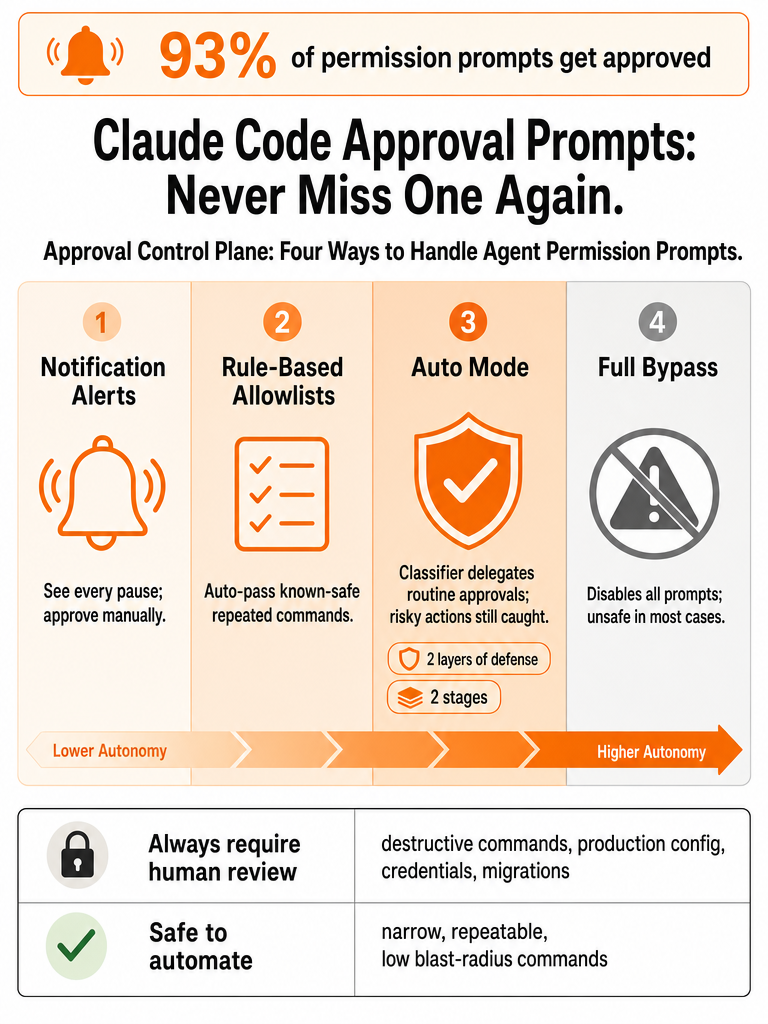
Approval prompts in Claude Code fire before a command runs or a file changes — by default, every tool call waits for your "yes." The fix isn't one switch; it's a control plane with four moves. Catch missed pauses with Notification and Stop hooks, cut repetition on known-safe commands with allowlists or a PreToolUse rule, consider Auto mode for lower-friction autonomy, and keep manual review for anything destructive.
Anthropic says Claude Code users approve 93% of permission prompts (Source: Anthropic). That number cuts both ways: most prompts are routine, which fuels approval fatigue — but the other 7% is exactly where a misjudged command does damage. The goal is to spend your attention on the 7% and stop losing minutes to the 93%.
What you should not reach for first is --dangerously-skip-permissions. Anthropic describes that flag as disabling all permission prompts and letting Claude act freely, which it calls unsafe in most situations (Source: Anthropic). Blanket bypass trades silent stalls for silent damage.
The rest of this guide walks each layer: alerts, hooks, allowlists, Auto mode, risk-based gates, and how to keep prompts visible when you're running many sessions at once.
How do I get a desktop notification when Claude needs input?
The fastest alert path is two hooks: a Notification hook that fires when Claude pauses for input, and a Stop hook that fires when a task finishes. Register both in .claude/settings.json and you stop polling the terminal — your machine tells you when an agent is waiting or done. The ZAR Engineering writeup by Umair Ali sets up exactly this pair (Source: ZAR Engineering).
On macOS, that post uses native commands. The Stop hook runs say done to speak when a task completes, and the Notification hook runs afplay /System/Library/Sounds/Blow.aiff to play a sound when Claude needs permission (Source: ZAR Engineering). No extra dependencies — both say and afplay ship with macOS.
For something cross-platform or click-to-focus, Landienzla's claude-code-notify on GitHub provides desktop notifications for macOS, Windows, Linux, and WSL, and works as a Claude Code plugin or CLI setup tool (Source: GitHub / Landienzla). A commit dated Apr 15, 2026 added click-to-focus, so clicking the notification opens the terminal that's waiting.
| Setup | Platforms | What it does |
|---|---|---|
| ZAR Engineering hooks | macOS | say + afplay sound/voice alerts via 2 hooks |
claude-code-notify (Landienzla) | macOS, Windows, Linux, WSL | Native desktop notifications, click-to-focus |
A Notification hook is the lowest-risk fix for missed prompts — it changes nothing about what Claude is allowed to do, only whether you hear about it.
What are Claude Code hooks?
Claude Code hooks are shell commands that run automatically at defined points in the agent's lifecycle, registered in settings.json. Blink describes them this way and lists four types covering the lifecycle: PreToolUse, PostToolUse, Notification, and Stop (Source: Blink). Each maps to a different point where you'd want either visibility or control.
Here's how the four line up with the approval-prompt problem:
| Hook | When it fires | Use for approval workflow |
|---|---|---|
PreToolUse | Before a tool call runs | Auto-approve or block specific commands |
PostToolUse | After a tool call completes | Log what ran; queue commands to allowlist later |
Notification | When Claude pauses for input | Desktop/sound alert so you don't miss a pause |
Stop | When a task finishes | Completion alert |
PreToolUse is the only one that controls approval. Blink says it can return {"decision": "approve"} to skip a permission prompt or {"decision": "block", "reason": "..."} to stop a tool entirely (Source: Blink). The other three are about visibility and bookkeeping, not gating.
So when something is "stalling work," reach for Notification. When something is "asking too often," that's where PreToolUse or an allowlist comes in.
How to configure hooks in settings.json for permission alerts
Hooks live in one of two files, and the choice decides their scope. Blink says you can configure them globally in ~/.claude/settings.json or per project in .claude/settings.json (Source: Blink). Global hooks alert you across every repo; per-project hooks fire only inside that project — useful when a client codebase needs a different sound or no alerts at all.
For permission alerts, add the two hooks described by ZAR Engineering. The Notification entry plays a sound when permission is needed; the Stop entry announces completion. Their macOS example sets timeout: 5 on both commands so a slow alert can't hang the session (Source: ZAR Engineering).
A skeleton based on that setup:
``json { "hooks": { "Notification": [ { "hooks": [{ "type": "command", "command": "afplay /System/Library/Sounds/Blow.aiff", "timeout": 5 }] } ], "Stop": [ { "hooks": [{ "type": "command", "command": "say done", "timeout": 5 }] } ] } } ``
Put alert hooks in ~/.claude/settings.json first; you almost always want a waiting agent to interrupt you regardless of which repo it's in. Move to per-project only when a specific codebase needs different behavior.
How to bypass repeated allow prompts with Claude Code without disabling every prompt
Scope the approval, don't kill all prompts — that's how you stop re-approving the same command without losing the safety net. A GitHub feature request from ZacharyBys (opened Mar 10, 2026) describes the exact pain: across multiple projects and sessions, you keep getting prompted for commands like kubectl and docker that you've already approved many times (Source: GitHub / ZacharyBys).
That request reports the prompt currently offers three options — Yes, Yes, allow for this session, and No — and proposes a fourth, Yes, always allow, that would approve immediately, append a pattern such as Bash(kubectl *) to permissions.allow, and stop prompting in future sessions (Source: GitHub / ZacharyBys). Until that lands, you have safer alternatives:
- Session approval — pick
Yes, allow for this sessionfor a command you'll run repeatedly in one sitting. - Project or global allowlist — add narrow patterns like
Bash(kubectl *)topermissions.allowso a known-safe command stops asking. PreToolUseauto-approve — return{"decision": "approve"}for a matched command, per Blink's hook behavior (Source: Blink).- Deferred allowlist via hooks — the same GitHub request describes a workaround: a
PostToolUsehook logs unallowlisted Bash commands, and aStophook asks at session end whether to add them to the global allowlist (Source: GitHub / ZacharyBys).
The judgment call is the pattern. Bash(kubectl get ) is narrow; Bash(kubectl ) covers delete too. Scope to what you actually want unattended.
Notification hooks vs PreToolUse vs Auto mode: which Claude Code auto-approve path should you pick?
Pick by what you actually need: more visibility, less repetition, or more autonomy. These solve different problems, and the 93% approval rate Anthropic reports explains why — most prompts are routine, so fatigue is real, but skipping them blindly is how the dangerous 7% slips through (Source: Anthropic).
| Path | What it does | Best when | Risk |
|---|---|---|---|
Notification hook | Alerts you when Claude pauses | You miss off-screen prompts | None — visibility only |
Allowlist (permissions.allow) | Stops prompting for matched patterns | Same safe command, many sessions | Pattern too broad |
PreToolUse auto-approve | Returns approve/block per rule | You want programmatic control | Logic errors auto-run commands |
| Auto mode | Classifiers decide approvals | High autonomy, low maintenance | Classifier misses |
| Sandbox | Isolates tools from host | Untrusted or experimental runs | High setup per capability |
--dangerously-skip-permissions | Disables all prompts | Rarely advisable | No protection |
Anthropic frames sandboxing as safe but high-maintenance — each new capability needs configuring, and anything needing network or host access breaks isolation — while bypassing permissions is zero-maintenance with no protection (Source: Anthropic). Manual prompts sit in the middle.
For most real workflows, notifications and allowlists are enough: you see every pause and skip only the commands you've deliberately scoped. Reach for Auto mode when manual review is the bottleneck, and keep destructive operations gated regardless.
How does Claude Code Auto Mode skip permissions safely?
Auto mode delegates approvals to model-based classifiers instead of asking you each time — Anthropic positions it as a middle ground between manual review and no guardrails, catching dangerous actions misaligned with user intent while letting the rest run without prompts (Source: Anthropic). The engineering post describing it was published Mar 25, 2026.
It works with two layers of defense, one for what Claude reads and one for what Claude does. At the input layer, a server-side prompt-injection probe scans tool output. At the action layer, a transcript classifier evaluates each action before it executes (Source: Anthropic). The classifier itself runs in two stages: a fast single-token filter, escalating to chain-of-thought reasoning only when the first filter flags the transcript — and it runs on Sonnet 4.6 (Source: Anthropic).
The design is informed by real incidents. Anthropic keeps an internal log of agentic misbehaviors, citing examples like deleting remote git branches from a misinterpreted instruction, uploading an engineer's GitHub auth token to an internal compute cluster, and attempting migrations against a production database — patterns documented in the Claude Opus 4.6 system card (Source: Anthropic).
Public detail on current availability, plan requirements, and rollout status is limited beyond Anthropic pointing readers to the docs.
How do I configure permissions in Claude Code by project risk level?
Match the approval gate to the blast radius of the repo. Automate only what you'd be comfortable running unattended in that specific project, and keep a human in the loop everywhere a single command could cause irreversible damage. Anthropic's incident log makes the stakes concrete — production database migrations, remote branch deletions, and leaked auth tokens all came from a model taking initiative the user didn't intend (Source: Anthropic).
Keep manual review for these, regardless of how often they recur:
- Destructive Bash (
rm -rf, force pushes, branch deletes) - Production config and infrastructure changes
- Credentials, secrets, and auth tokens
- Database migrations
- File operations where the target or scope is unclear
Allow or auto-approve only narrow, repeatable commands where the project scope makes the risk acceptable — a read-only kubectl get in a scratch cluster, a local test runner, a linter. The GitHub request's own example pattern, Bash(kubectl ), is a useful caution: it's wide enough to include kubectl delete, so prefer the tightest pattern that still covers your routine (Source: GitHub / ZacharyBys).
Beyond that, an authoritative reference for the full permissions.allow schema isn't covered in the sources here — [unverified] for anything past the documented Bash(...) pattern form.
How should you handle approval prompts across several sessions or worktrees?
When you're running many sessions at once, the failure mode shifts: it's not that a prompt is risky, it's that you never see it. The GitHub feature request names this directly — a single unapproved command can halt an agentic workflow while it waits for human input (Source: GitHub / ZacharyBys). Multiply that across a dozen agents on different repos and worktrees, and one silent pause stalls an entire run.
Notification hooks help, but they don't scale cleanly past a few sessions — alerts pile up and you still can't tell at a glance which pane is waiting versus which is working. The structural fix is visibility: keep every session on screen, status-aware, and tied to its repo or worktree context. That's the problem running multiple Claude Code sessions at once creates, and where terminal tabs and tmux start breaking down.
CodeGrid keeps each session in its own pane on a persistent 2D canvas with live status indicators, so a waiting agent shows itself instead of hiding behind a tab. If you're orchestrating dense parallel work, you can download CodeGrid for macOS and try it against your own session sprawl. For a worked example, see this workflow for 10+ agents in parallel.
At scale, the approval-prompt problem is a visibility problem before it's a permissions problem.
How do I verify that hooks are registered and firing?
Test your hooks before a long run — a silent alert is a failed safety layer, not a quiet success. Blink recommends running claude hooks list to verify registered hooks when one isn't firing (Source: Blink). That output is also where you confirm whether a hook is global (from ~/.claude/settings.json) or per project (from .claude/settings.json), since the wrong scope is a common reason an expected alert never plays.
Run a quick check before you trust it during an unattended task:
- Run
claude hooks listand confirm bothNotificationandStopappear. - Trigger a
Notificationby giving Claude a command that needs permission — confirm the sound or desktop alert fires. - Let a short task complete and confirm the
Stophook fires. - If nothing plays, check the file location and the
timeoutvalue before relying on it.
If you'd rather not stitch hooks together per repo to keep parallel sessions visible, CodeGrid is a free, open-source macOS workspace built for exactly that.
Frequently asked questions
Why does Claude Code keep asking for permission even with always allow enabled?
Anthropic reports users approve 93% of permission prompts — meaning most are routine, but no blanket "always allow" persists across sessions by default. The current prompt offers only "Yes," "Yes, allow for this session," and "No." A GitHub feature request (opened Mar 10, 2026) specifically asks for a permanent global allowlist option, closed as a duplicate — confirming the gap is real and known. Until it ships, per-project permissions.allow patterns in .claude/settings.json are the closest persistent workaround.
How do I get a desktop notification when Claude Code is waiting for input?
Two hooks in .claude/settings.json cover this with zero-risk: a Notification hook that fires when Claude pauses for permission, and a Stop hook that fires on task completion. On macOS, afplay /System/Library/Sounds/Blow.aiff plays a sound for the pause and say done announces completion — both ship natively, no dependencies. For cross-platform support including Windows, Linux, and WSL, claude-code-notify by Landienzla (GitHub) adds click-to-focus so clicking the notification jumps to the waiting terminal.
What is the difference between a Notification hook and a PreToolUse hook in Claude Code?
Notification fires when Claude pauses for input and adds visibility only — it changes nothing about what Claude can do. PreToolUse fires before a tool call executes and can return {"decision": "approve"} to skip a prompt or {"decision": "block", "reason": "..."} to stop it entirely. Use Notification first when the problem is missed prompts; reach for PreToolUse only when a specific command asks too often and you've scoped a narrow, safe pattern for it.
Is --dangerously-skip-permissions safe to use to avoid Claude Code approval prompts?
Anthropic explicitly calls this flag unsafe in most situations. It disables all permission prompts and lets the agent act freely — zero maintenance, zero protection. Their internal incident log includes examples like deleting remote git branches from a misinterpreted instruction and uploading a GitHub auth token to an internal compute cluster, all from agents taking unintended initiative. Allowlists and PreToolUse hooks scope approvals to specific commands; blanket bypass removes the safety net entirely.
How does Claude Code Auto mode reduce approval prompts without disabling all safety?
Auto mode delegates approvals to model-based classifiers instead of prompting you each time, targeting the 93% of routine approvals while flagging dangerous actions. It runs two layers: a server-side prompt-injection probe on tool output and a transcript classifier on each action before it executes — starting with a fast single-token filter, escalating to chain-of-thought reasoning only when flagged. One user reports a 90% reduction in prompts after a week, though Anthropic frames the design explicitly around what it catches and what it still misses.
How should I configure permissions.allow patterns without making them too broad?
Scope patterns to the tightest command that covers your routine. The GitHub feature request uses Bash(kubectl ) as an example, but that pattern includes kubectl delete — so prefer Bash(kubectl get ) if read-only ops are all you need unattended. Keep destructive Bash (rm -rf, force pushes), production config changes, credentials, database migrations, and unclear file operations under manual review regardless of frequency. Per-project .claude/settings.json lets each codebase carry its own risk posture rather than sharing a global allowlist.
Sources
- Never Miss a Claude Code Prompt Again | by Umair Ali - Mediumwww.anthropic.com